Fast Track AI (2025)

Fast Track AI

“It’s not a module or a feature; it’s a platform. And it’s the industry’s first natural language CRM” — Simon Lidzén, CEO, quoted fom iGaming Future
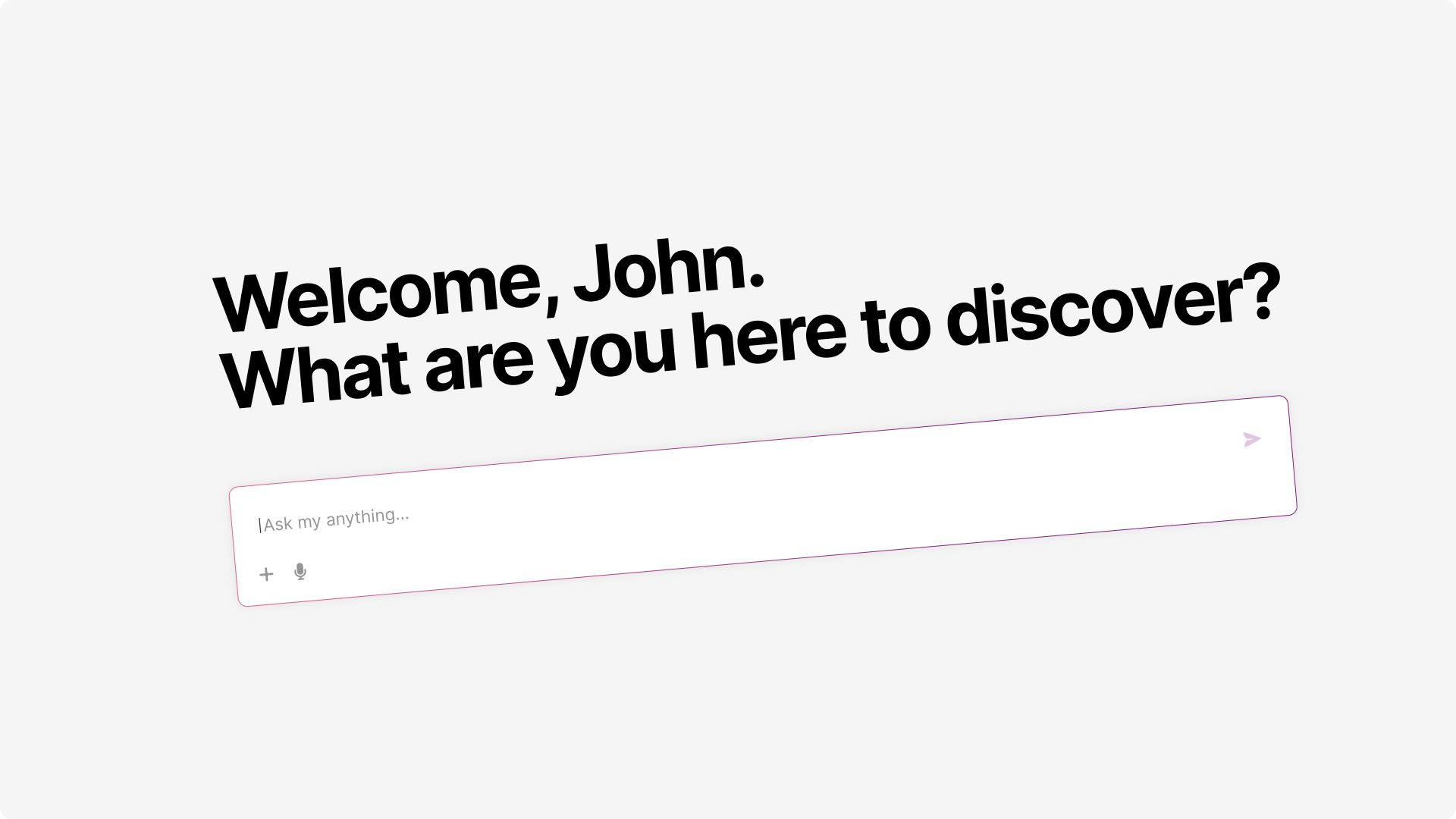
Fast Track AI welcome interface showing natural language input and capability chips

Impact

  • Shipped a functional MVP in approximately 2 months, working alongside CPO, CTO, Head of Product, and a team of engineers including a data scientist and four developers. This timeline required ruthless prioritization and clear scope boundaries from day one, with daily syncs keeping everyone aligned.
  • The rollout reached all live partners, with roughly 25% actively using the feature within the first days after launch. Internal updates noted "sticky usage" as partners returned daily, indicating genuine utility rather than novelty-driven exploration.
  • The capability shift was dramatic: data analysis that previously required days of back-and-forth between CRM and BI teams now happens in minutes through natural conversation. One partner noted this "made their life easier both from an execution perspective as well as reporting."
  • Campaign creation now supports automatic content generation and translation across markets, turning what was hours of configuration into a single request. The AI generates SMS content, schedules activities per market with appropriate local timing, and pre-fills existing modals so users can review before committing.
  • Industry reviewers called it "one of Fast Track's most disruptive innovations in CRM," noting that natural language AI opens up advanced capabilities to teams who previously needed technical support for every campaign.
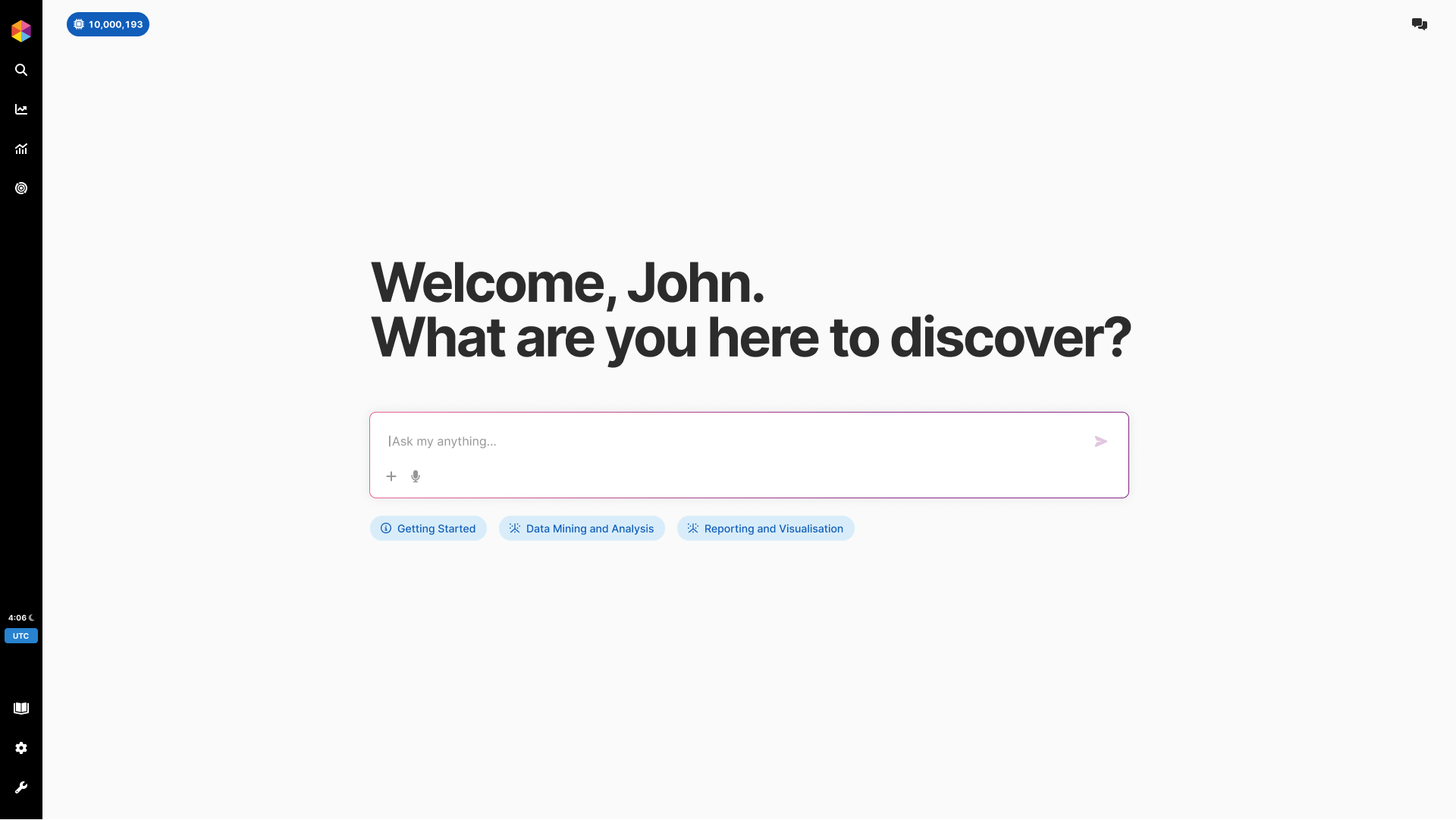
Fast Track AI welcome screen with natural language input and quick-start chips for Data Mining and Reporting
Entry point designed to communicate capabilities while inviting exploration
Timeline
Q3 2025 (2-month MVP)
Team
9 (Product Designer, Data Scientist, 2 Backend, 2 Frontend, CPO, CTO, Head of Product, Head of User Adoption)

The Problem

CRM teams at iGaming operators were bottlenecked by technical complexity that prevented them from acting on their own ideas. This pressure wasn't just internal. At a recent industry panel, CEOs from Flutter, Super Group, Betsson, and Betfred all emphasized the same point: workflow automation and advanced AI adoption are now core priorities. The shift from idea to execution is where the industry is heading. Getting insights required BI expertise or hours of manual Data Studio configuration involving measures, dimensions, filters, and time groupings that most CRM professionals never learned to navigate. Campaign creation meant understanding segment logic, configuring triggers across channels, and managing timing for multiple markets. Ideas sat in queues waiting for technical resources, and by the time answers arrived, the moment had often passed. Fast Track already offered Singularity (algorithmic one-to-one player experiences) and Greco (gameplay risk engine). AI needed to complement these existing modules, not compete with them. Meanwhile, competitors were adding 'AI' as a checkbox feature without genuine capability, creating pressure to deliver something that actually transformed how CRM teams work.

Core Issues:

  • BI Bottleneck
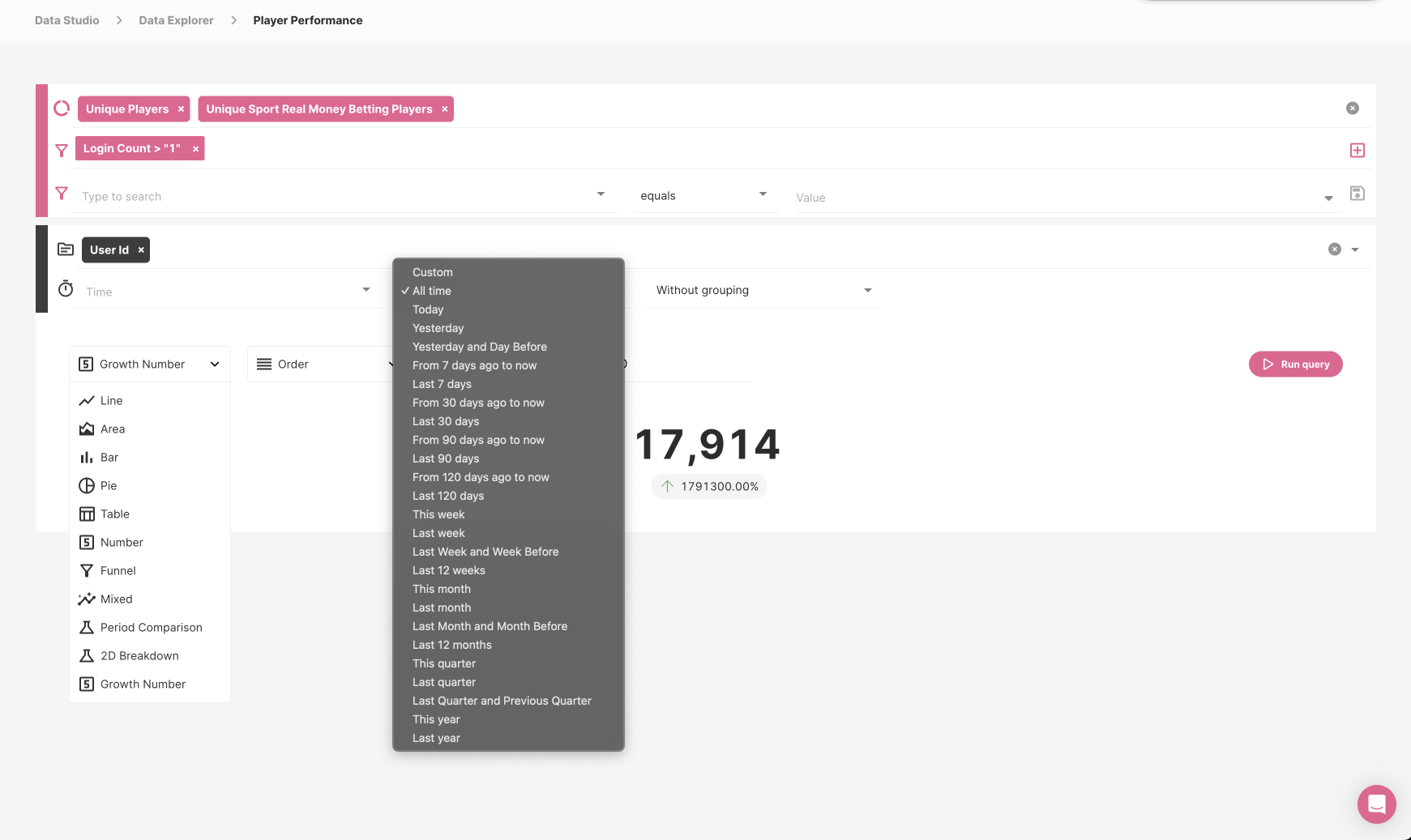
    To analyze player performance, users navigated to Data Studio, selected measures and dimensions from extensive lists, configured filters and time groupings with options ranging from seconds to years, understood query logic well enough to combine multiple conditions, ran queries, and interpreted raw results without guidance. This required BI expertise that most CRM teams simply did not have, so questions sat in queues between departments for days while operators waited for answers.
    Impact: Days of delay between question and answer, missed opportunities for timely intervention, and CRM teams unable to self-serve the insights they needed to do their jobs effectively.
  • Configuration Complexity
    Campaign creation required navigating multiple screens, understanding segment logic to define audiences, configuring triggers across email, SMS, and on-site channels, setting up timing that accounted for player timezones and market-specific paydays, and managing content in multiple languages. Each step presented dozens of options, and small mistakes meant campaigns misfired, targeted wrong audiences, or never ran at all.
    Impact: Hours per campaign, high error rates requiring rework, and creative ideas abandoned because the execution friction exceeded the perceived value of trying.
  • Technical Debt Reality
    The existing platform had accumulated complexity over years of feature additions serving diverse partner needs. Any new capability had to integrate cleanly without creating a parallel system that would confuse users or adding more cognitive load to an already dense interface. We could not break what was already working to add something new.
    Impact: Constraint on integration approach that required extension architecture rather than replacement, respecting existing user knowledge while adding new capabilities.

Why It Mattered:

  • CRM teams had ideas but lacked the technical ability to execute them without depending on other departments
  • BI teams were bottlenecked serving multiple departments simultaneously, creating delays that reduced the value of insights
  • Competitors adding AI as a marketing checkbox created pressure to deliver genuine capability rather than feature theater
  • The industry is entering a period of major digital transformation. Platform needed differentiation, and natural language interaction represented a genuine step change in how CRM teams get from idea to execution
Data Studio interface showing complex configuration with filters, dimensions, time ranges, visualization types, and a dropdown listing options from Custom through Last year
Before: Getting player data required navigating Data Studio and understanding dozens of configuration options
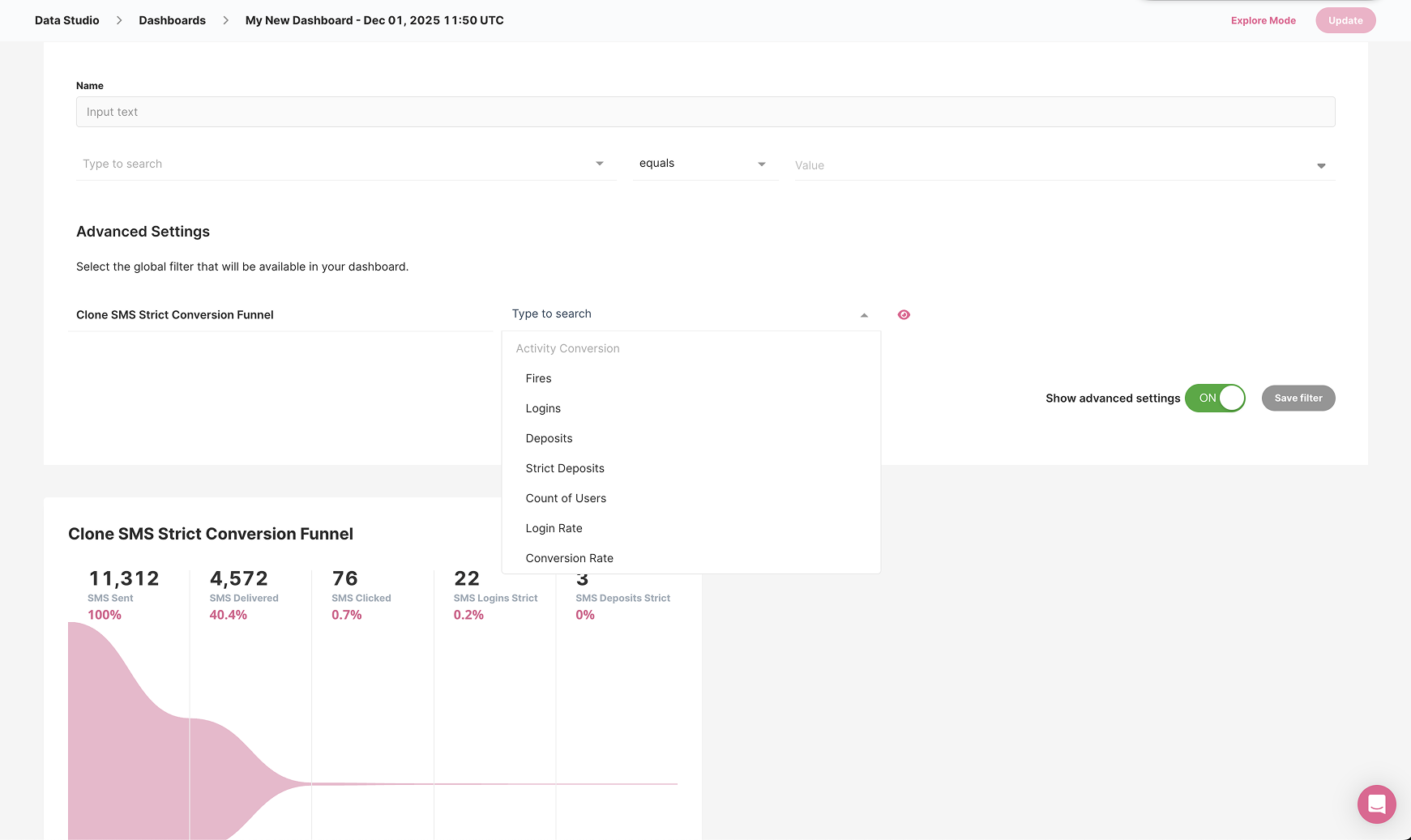
Data Studio dashboard builder showing advanced settings, conversion funnels, and multiple filter dropdowns with metrics like SMS Sent, SMS Delivered, SMS Clicked
Before: Building dashboards meant configuring filters, conversion metrics, and advanced settings across multiple panels

My Approach

1. Extension Over Replacement

Decision: AI as amplifier of existing platform, not a parallel system that would fragment user workflows

Rationale: I advocated for integration over isolation from the earliest strategy sessions. Adding AI as a separate product would create two ways to do everything, neither complete, forcing users to context-switch constantly and never build confidence in either path. Instead, I designed AI to use existing modals and patterns wherever possible, so the new capability felt like a natural extension of what partners already knew.

Result: Partners adopted AI alongside existing workflows immediately. When AI creates activities, it populates the same Activity modal users already know, complete with segment targeting, market selection, and timing configuration. New entry point, familiar execution, no retraining required.

2. Dedicated Space Over Scattered Entry Points

Decision: Single AI interface in the main navigation rather than contextual AI buttons scattered throughout the platform

Rationale: I evaluated three options during the strategy phase: a global command palette similar to Spotlight that could be invoked anywhere, contextual AI buttons on every relevant screen, or a dedicated AI space accessed from the main navigation. I chose dedicated space because enterprise users committing real budgets needed clear scope boundaries. Scattered entry points would create confusion about what AI could do in each context.

Result: Users understand AI as a distinct capability with clear boundaries. The welcome screen chips communicate exactly what is possible before users type anything, preventing the frustration that comes from discovering limitations after attempting something.

3. Multimodal Input for Flexibility

Decision: Support text, voice dictation, and file uploads as input methods from the start

Rationale: Different users have different preferences and contexts. Some want to type precise queries, others prefer dictating while reviewing other screens, and some need to upload files like sales reports for AI analysis. Restricting to text-only would have limited adoption among users who find typing cumbersome or who work with external data sources.

Result: Voice transcription works reliably for users who prefer dictation, and file uploads enable workflows like generating detailed reports from uploaded PDFs that would be impossible with text-only input.

4. Honest Boundaries Over Confident Promises

Decision: Constrain scope aggressively and communicate limits clearly upfront rather than letting users discover them through failure

Rationale: Early prototypes let AI attempt any query, which seemed user-friendly but caused problems in testing. Users were confused and frustrated when AI confidently attempted questions outside its actual capabilities. I redesigned the welcome experience to show specific capabilities through labeled chips (Data Mining & Analysis, Reporting & Visualisation) rather than open-ended "Ask anything" framing.

Result: Usage errors dropped significantly after the redesign. Partners understood what AI could and could not do before investing time, so their attempts were more likely to succeed and their overall impression more positive.

5. Conversational Error Recovery

Decision: Errors as dialogue opportunities with clear recovery paths, not dead ends that require starting over

Rationale: Enterprise users committing real budgets need to trust the system even when it fails, because failures are inevitable with AI. I designed comprehensive error states where AI takes responsibility using first-person language ("I will simplify and retry", "This turned into more than I could handle") and always provides a specific recovery action. The tone is collaborative rather than blaming.

Result: Partners reported feeling in control even when things went wrong. Trust was maintained through transparency about what happened and clear guidance on what to do next.

Key Design Decisions

Natural Language Entry Point with Multimodal Input

Clean welcome screen with personalized greeting, open input field supporting text entry, voice dictation via microphone button, and file attachments for document-based queries. Capability chips below the input serve dual purpose: quick-starts for common tasks and scope communication showing what the system can actually do. Persistent disclaimer about AI limitations visible from the start builds appropriate trust calibration.
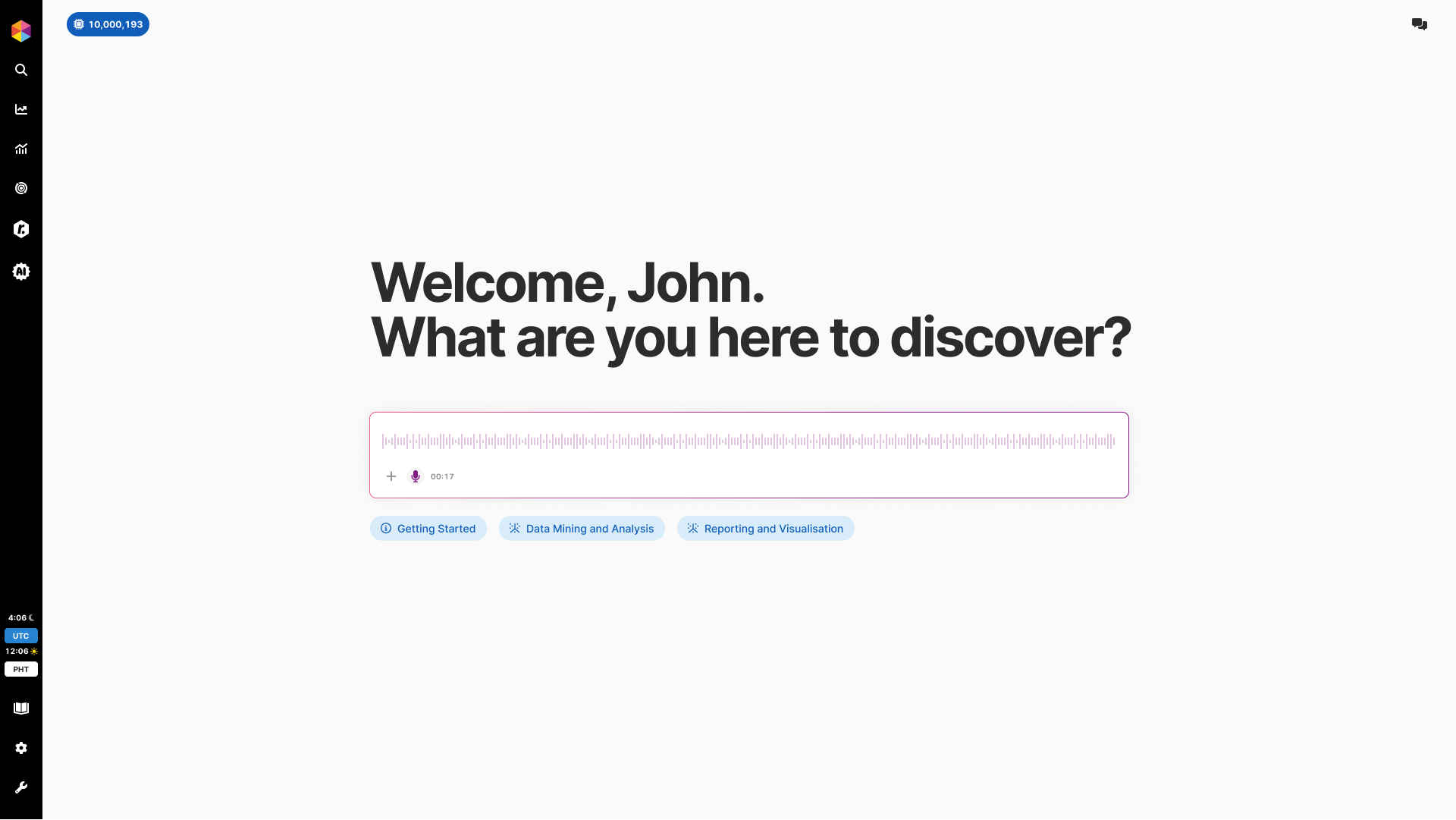
Fast Track AI welcome interface showing input field with attachment and microphone icons, plus capability chips

Entry point balances invitation with honest scope communication, supporting text, voice, and file inputs

File Upload for Document-Based Analysis

Users can attach files directly in the input field, enabling workflows like uploading a sales report PDF and requesting detailed analysis. The attached file appears as a chip above the input field, making it clear what context the AI will use. This extends AI utility beyond platform data to external documents that partners work with regularly.
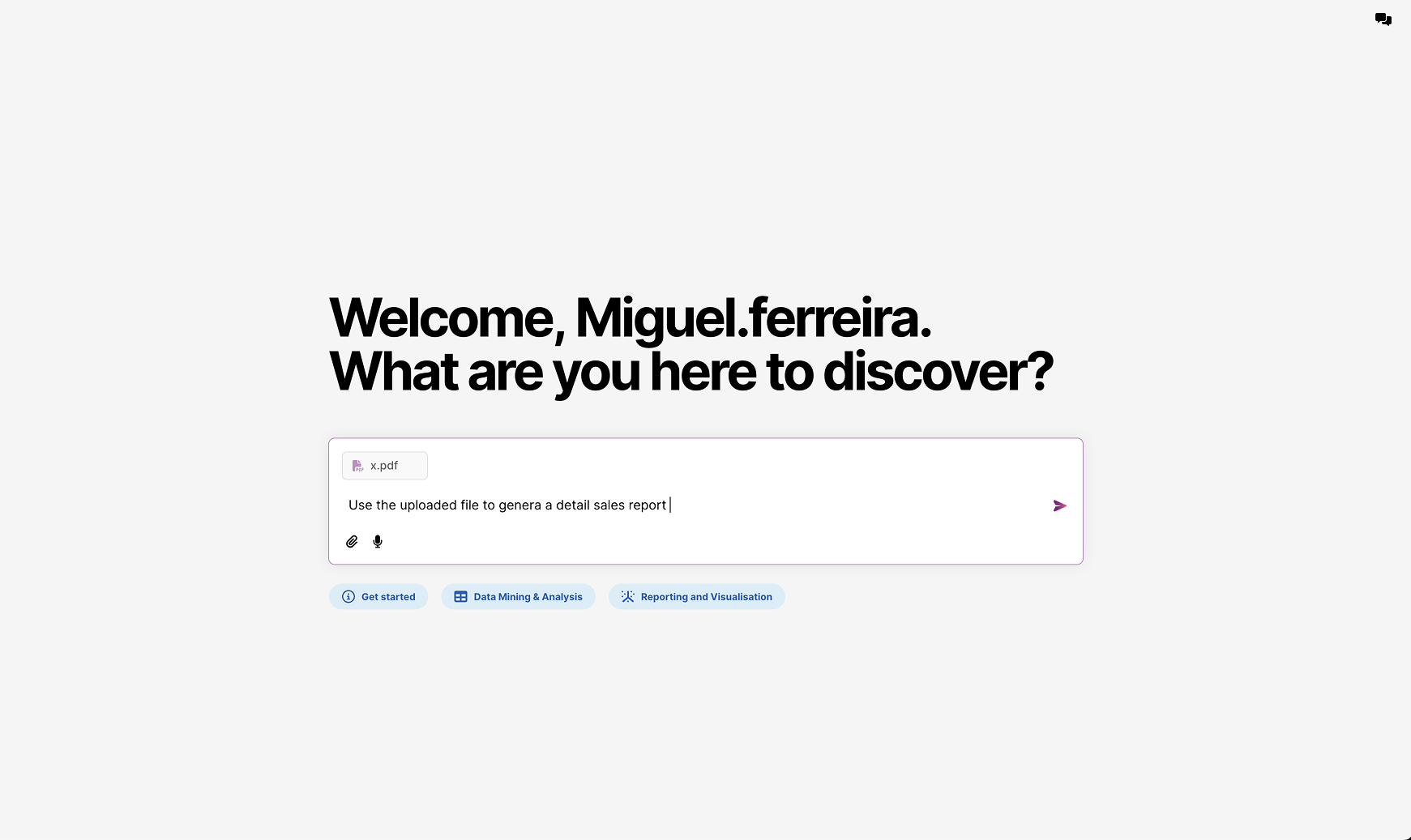
Welcome screen showing attached PDF file with prompt requesting detailed sales report generation

File upload enables document-based queries, extending AI beyond platform data to external reports

AI That Takes Action with Structured Confirmation

When asked to create campaigns, AI executes the request across multiple markets and shows structured confirmation: what was created, which markets were targeted with country flags for visual scanning, scheduled dates per activity, and the generated content including translated SMS messages. Created items are clickable for direct navigation. Token usage displayed at bottom provides cost transparency without interrupting the flow.
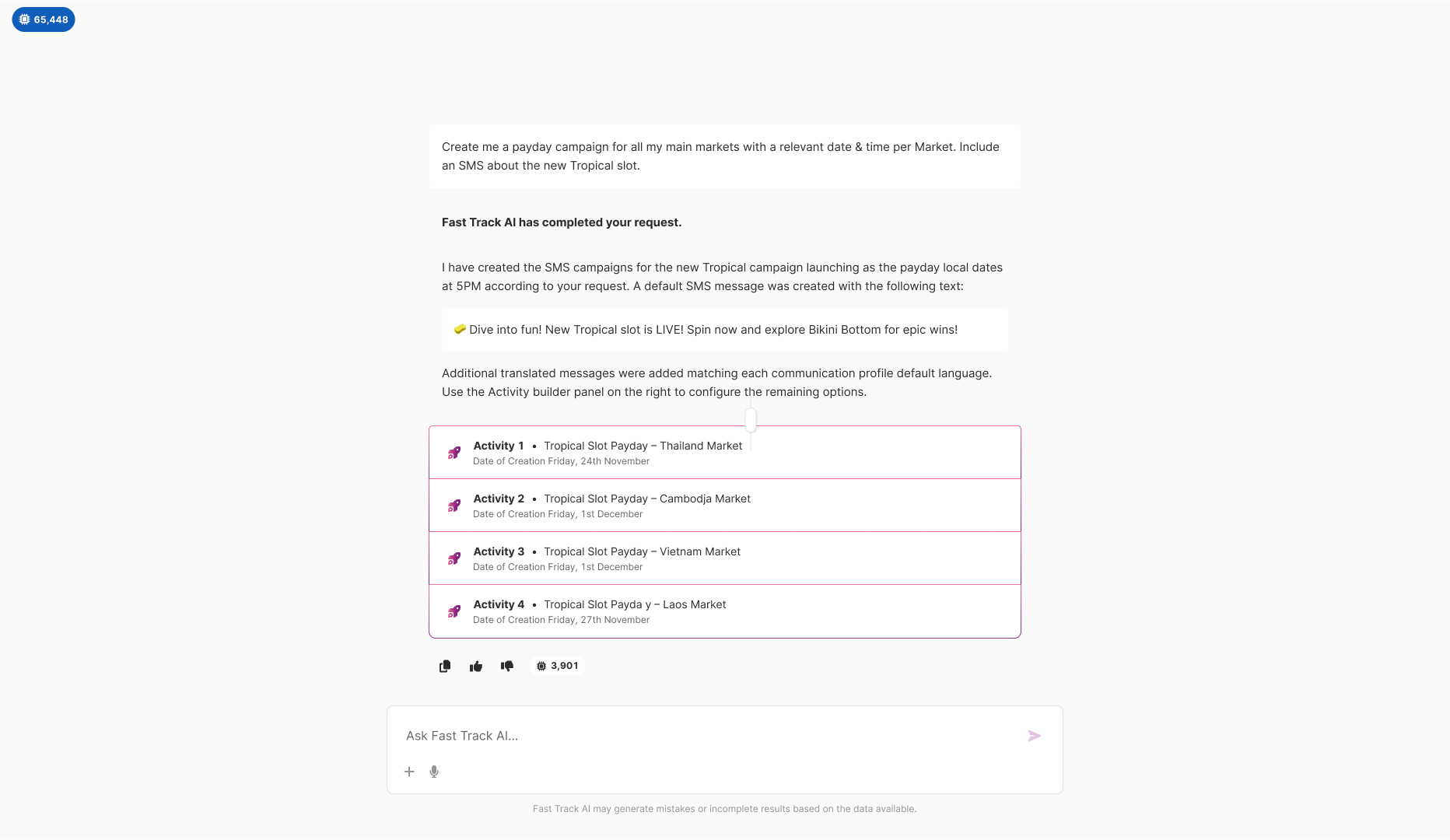
AI response showing created SMS campaigns for Thailand, Cambodia, Vietnam, and Laos markets with generated content and token count

AI that acts: Creates campaigns across markets with automatic content generation and translation, showing exactly what was built

Existing Modal Integration

AI-generated content populates existing platform modals rather than creating new confirmation interfaces. Campaign creation uses the same Activity modal users already know, pre-filled with AI-generated settings including activity name, type, trigger date, segment targeting with player origins and markets, and placeholder for actions. Users can review, modify any field, and save using familiar patterns. AI handles the complexity of configuration while existing UI handles the trust of final confirmation.
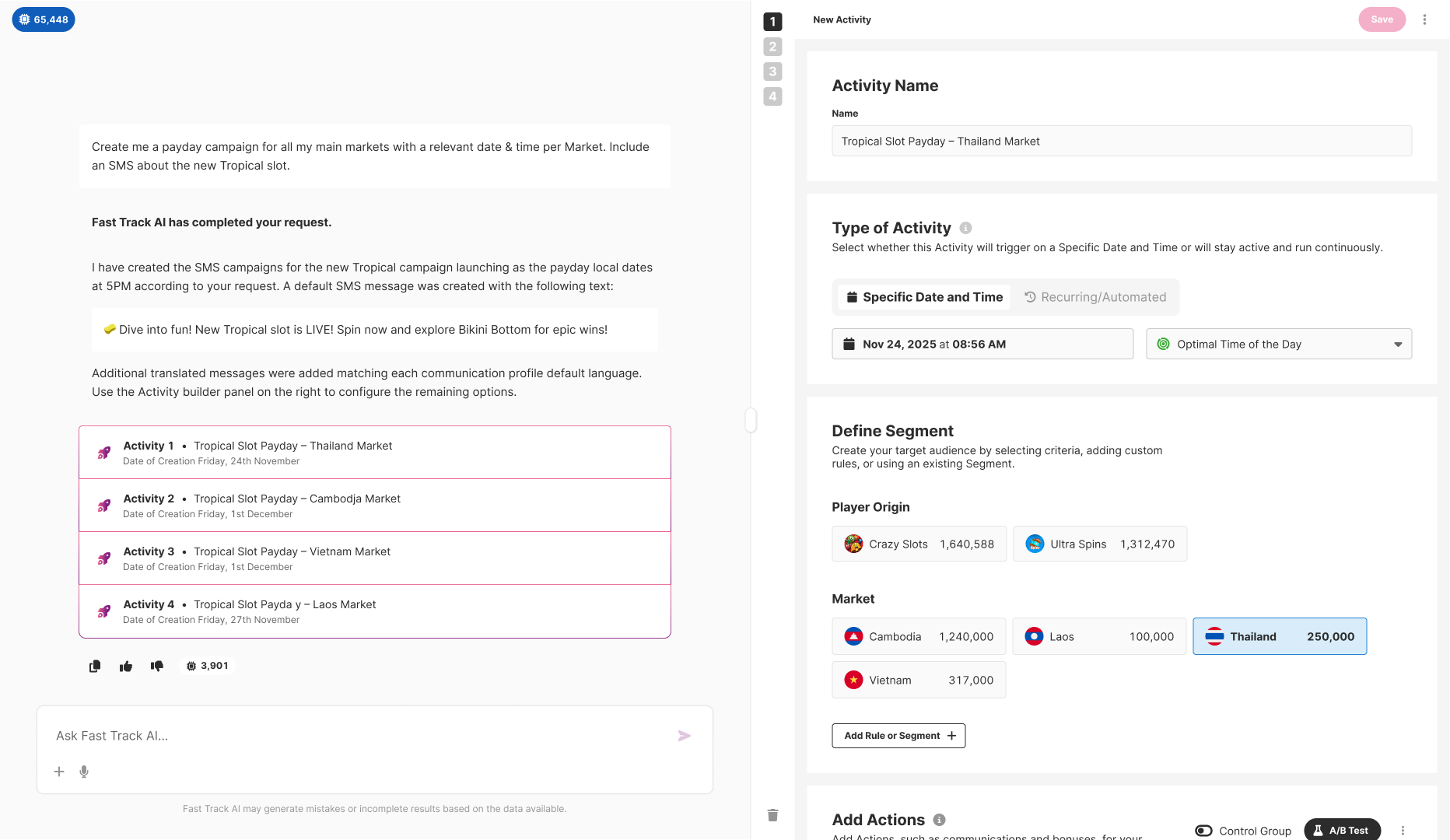
Split view showing AI conversation on left with created activities, and existing Activity modal on right pre-filled with Thailand Market campaign settings

Extension pattern: AI output integrates with existing modal, keeping users in familiar territory for final review and confirmation

Intelligent Analysis with Actionable Output

Complex analyses return structured reports with clear visual hierarchy: summary sections with key metrics, highlighted values for critical findings (revenue figures, status indicators using color-coded badges), strategic recommendations with specific next steps, and suggested follow-up queries as clickable chips. Chat history preserved in sidebar shows previous queries for context continuity. The goal is actionable insight that tells users what to do, not just raw data requiring interpretation.
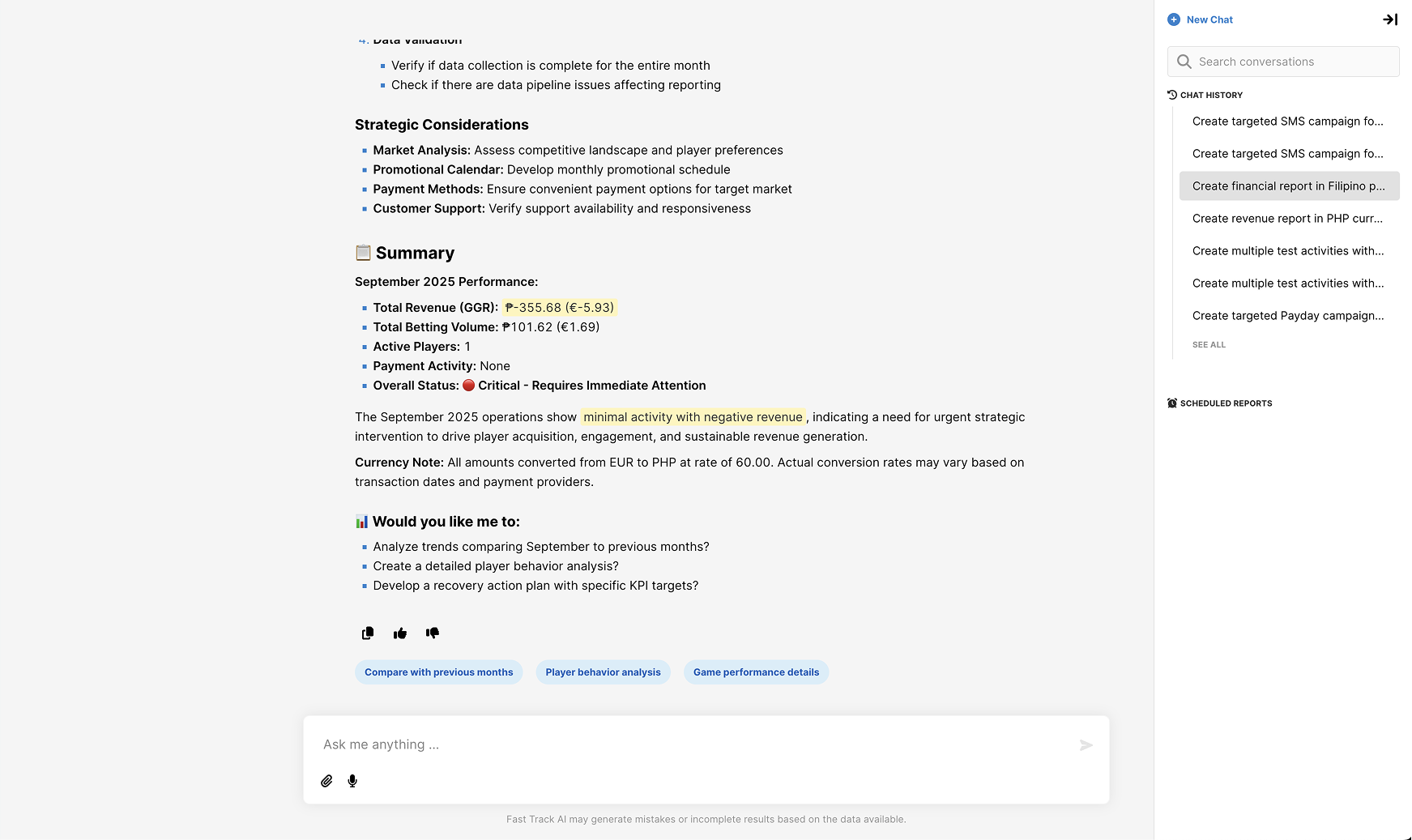
Analysis output showing Summary with September 2025 Performance, strategic considerations, and follow-up suggestions with chat history sidebar

Actionable insights: Key metrics highlighted, status indicators color-coded, strategic recommendations provided, one-click follow-ups available

Comprehensive Error Handling System

Categorized error states for generic issues (query too complex, compilation failures), connection problems (dropped mid-run, fetch failures), and capacity limits (token caps, rate limiting). Each error type uses conversational first-person language where AI takes responsibility ("I will simplify and retry", "I have stopped myself to learn from it") and provides a specific recovery action with a clear button. Every error is a path forward with guidance, not a wall.
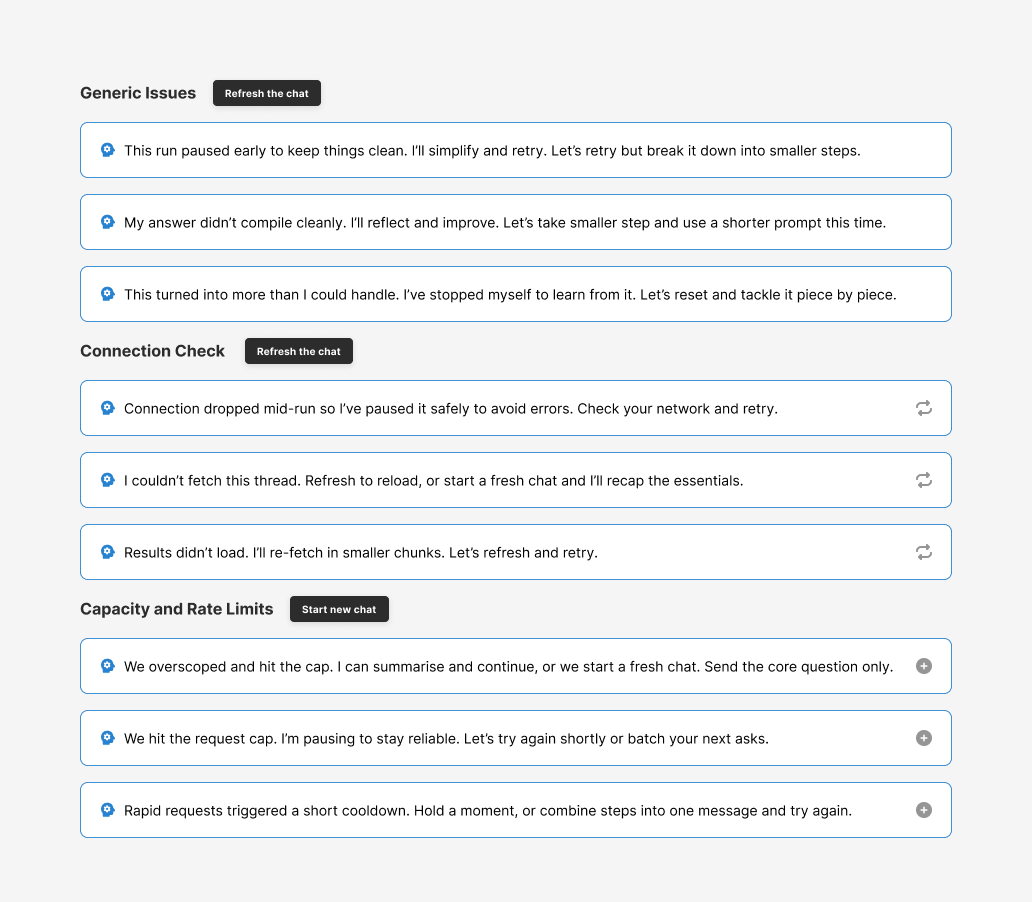
Error handling documentation showing Generic Issues, Connection Check, and Capacity and Rate Limits categories with recovery buttons

Trust infrastructure: Every error has a conversational explanation and a specific recovery path, AI takes responsibility

Implementation

Technical Approach:

  • LangChain integration with enterprise database access optimized for iGaming data structures including player activity, financial metrics, and campaign performance
  • Multimodal input handling supporting text entry, voice transcription, and file upload with appropriate preprocessing for each type
  • Existing modal population via shared state management that preserves all validation rules, ensuring AI-generated content meets the same requirements as manual entry
  • Error categorization system mapping LangChain failures to user-friendly recovery flows with specific guidance for each failure type
  • Token usage tracking integrated and displayed per response, providing cost transparency without interrupting workflow
  • Chat history persistence enabling context continuity across sessions so users can reference and build on previous queries
  • Real-time response streaming for long analyses, showing progress and partial results rather than blank waiting states
  • Baseline defaults system for handling uncertainty without hallucination, preferring to ask clarifying questions rather than guess incorrectly

Rollout Strategy:

  • Weeks 1-3: Foundation
    • Participated in strategy sessions with the full team to define scope and establish extension architecture as core principle
    • Designed entry point patterns, multimodal input handling, and core conversation interface
    • Created error handling framework mapping technical failures to conversational recovery flows with specific actions
    • Established scope communication approach using capability chips rather than open-ended framing
  • Weeks 4-6: Core Capabilities
    • Built reporting and analysis output patterns with actionable formatting, highlighted metrics, and contextual follow-ups
    • Developed activity creation flow with automatic multi-market support and content generation
    • Implemented modal integration ensuring AI-generated content populates existing interfaces correctly
    • Designed structured confirmation patterns showing exactly what AI created with visual hierarchy for scanning
  • Weeks 7-8: Polish and Validation
    • Refined error states based on LangChain testing sessions, expanding categories to cover observed failure modes
    • Tightened scope communication after observing early user confusion with open-ended framing
    • Optimized response streaming for longer analyses to maintain engagement during processing
    • Internal testing and iteration before partner rollout, focusing on edge cases and failure recovery
  • September 2025: Launch and Early Access
    • Deployed platform-wide to all live partners with feature enabled
    • Achieved roughly 25% of partners actively using the feature within first days
    • Collected feedback via Slack and direct partner communication identifying areas for iteration
    • Observed sticky daily usage patterns indicating genuine utility rather than novelty exploration

Process

Strategy: Participated in ideation sessions during weeks one through three. Defined scope boundaries early with reporting and analysis as Phase 1 focus, campaign creation as Phase 2. Established extension architecture over replacement as the core principle.

Research: Used LangChain testing sessions as design research, treating every failure mode as a requirement for error handling. Partner feedback from adjacent features informed expectations about what CRM teams wanted to do but could not. No formal user research timeline was available given speed requirements, so we relied on internal expertise and rapid iteration.

Design: Rapid prototyping with daily engineering feedback kept design and development synchronized. Focused on trust patterns first including error handling, scope communication, and confirmation flows because these had to be right from day one. Visual polish was explicitly deferred to post-MVP iteration.

Development: Eight-week sprint with continuous designer-engineer collaboration. Decisions made in prototype reviews rather than specification handoffs, accelerating the feedback loop. Scope adjusted weekly based on technical reality and testing findings.

Validation: Rolled out platform-wide to all live partners in September 2025 with monitoring. Feedback collected via Slack and direct partner communication. Observed roughly 25% of partners active within first days and sticky daily usage patterns.

Post-launch: Featured in iGaming Future and reviewed by EngageHut following launch. Phase 2 campaign creation capabilities now released. Continuous iteration based on usage data and partner feedback continues.

Validation & Results

Measured Outcomes:

  • Adoption Metrics
    • Rolled out platform-wide to all live partners following the September 2025 launch
    • Roughly 25% of partners were actively using the feature within the first days after launch
    • Internal updates noted "sticky usage" as partners returned daily, indicating the feature delivered ongoing value rather than one-time curiosity
    • Sustained engagement patterns observed over the following weeks as partners integrated AI into their regular workflows
  • Partner Reception
    • "We can now analyse data very quickly... previously it took days to pass between CRM and BI teams. This has made their life easier both from an execution perspective as well as reporting."
    • "The guys are loving Fast Track AI... They are excited to see how it can grow and reduce manual work."
    • "Really good feedback overall, people are impressed with the capabilities."
    • "Partners want to use it beyond reporting capabilities, looking forward to future updates for campaign creation."
  • Constructive Feedback Addressed
    • Token double-charging concerns raised early and addressed with improved usage transparency showing cost per response
    • Hallucination issues where AI invented data names caught and fixed by tightening scope and improving uncertainty handling
    • Security concerns around email export permissions flagged and added to roadmap for proper audit trail implementation
    • Strong demand for campaign creation capabilities validated Phase 2 direction, which has since shipped

Technical Success:

  • MVP shipped on 2-month timeline as planned despite the scope including multimodal input and multi-market campaign creation
  • Integration with existing platform maintained full stability with no regression in core functionality
  • LangChain error handling achieved acceptable reliability for production use, with clear recovery paths for edge cases
  • Foundation architecture confirmed capable of supporting Phase 2 expansion into additional action types

What I Learned

What Worked:

  • Extension beats replacement when introducing new capabilities to a mature platform. Using existing modals for AI-generated content meant partners learned one new entry point rather than an entirely new system, and the familiar confirmation step maintained trust even when the generation step was novel.
  • Scope communication prevents frustration more effectively than graceful failure handling. Redesigning the welcome screen to show specific capabilities upfront through labeled chips changed user expectations before they invested time. Constraints communicated clearly become features rather than limitations.
  • Error handling is trust infrastructure that deserves significant investment. Comprehensive, conversational error states with specific recovery paths prevented individual failures from undermining overall confidence. Users forgive mistakes when they understand what happened and have clear guidance on what to do next.
  • Multimodal input expands utility without adding complexity when implemented thoughtfully. Supporting voice dictation and file uploads alongside text made the feature accessible to users with different preferences and enabled workflows that text-only input would have blocked entirely.

Challenges Solved:

  • Hallucination control with large database access where AI could confidently state incorrect information: Tightened scope aggressively after observing early testing issues. Redesigned welcome experience to communicate boundaries clearly through specific capability chips. Changed AI behavior to question when uncertain rather than guessing confidently, and added baseline defaults for ambiguous situations.
  • Integrating with existing platform technical debt while shipping on a 2-month timeline: Chose extension architecture over replacement. AI uses existing modals and patterns wherever possible rather than building parallel interfaces. New entry point, familiar execution patterns. This avoided creating divergent systems while respecting the user knowledge partners had already built.
  • Building enterprise trust for AI that takes real actions affecting campaigns and player communications: Structured confirmations showing exactly what will happen before execution, using existing modals for final review. Clear display of what was created with visual hierarchy for quick scanning. Persistent disclaimer about AI limitations. Every design decision filtered through the question: does this increase or decrease user control?
  • Cross-functional alignment under time pressure with multiple stakeholders having different priorities: Daily syncs with engineering team kept everyone aligned on what was shipping and what was deferred. Active participation in strategy sessions with CPO and CTO rather than receiving requirements passively. Prototype-driven communication replaced specification documents, accelerating decisions and surfacing issues earlier.

Strategic Insight:

The real product is not the AI capability itself but the confidence users feel when using it. Partners commit real budgets through this system, targeting real players with real money at stake. Every design decision must answer: does the user feel in control? Do they understand what will happen before it happens? Can they recover from mistakes without losing their work or their trust? AI capability means nothing without the trust infrastructure to support it. The goal is empowering CRM professionals to unleash their creativity without the constant technical barriers that have historically slowed them down.